To add your own loot to the Anglers Almanac mod, you’ll be working within the Hytale Asset Editor to create a new FishLootManager asset.
The loot file uses the Loot File Structure
1. Create the Loot Asset
- Open the Hytale Asset Editor.
- In the Asset Browser, right-click
FishLootManager. - Select
Create FishLootManager. - Unique Asset ID: Give it a unique name (e.g.,
Iron_Drop).- Note: This is the internal ID used for asset referencing and does not affect the item given.
2. Define Item Properties
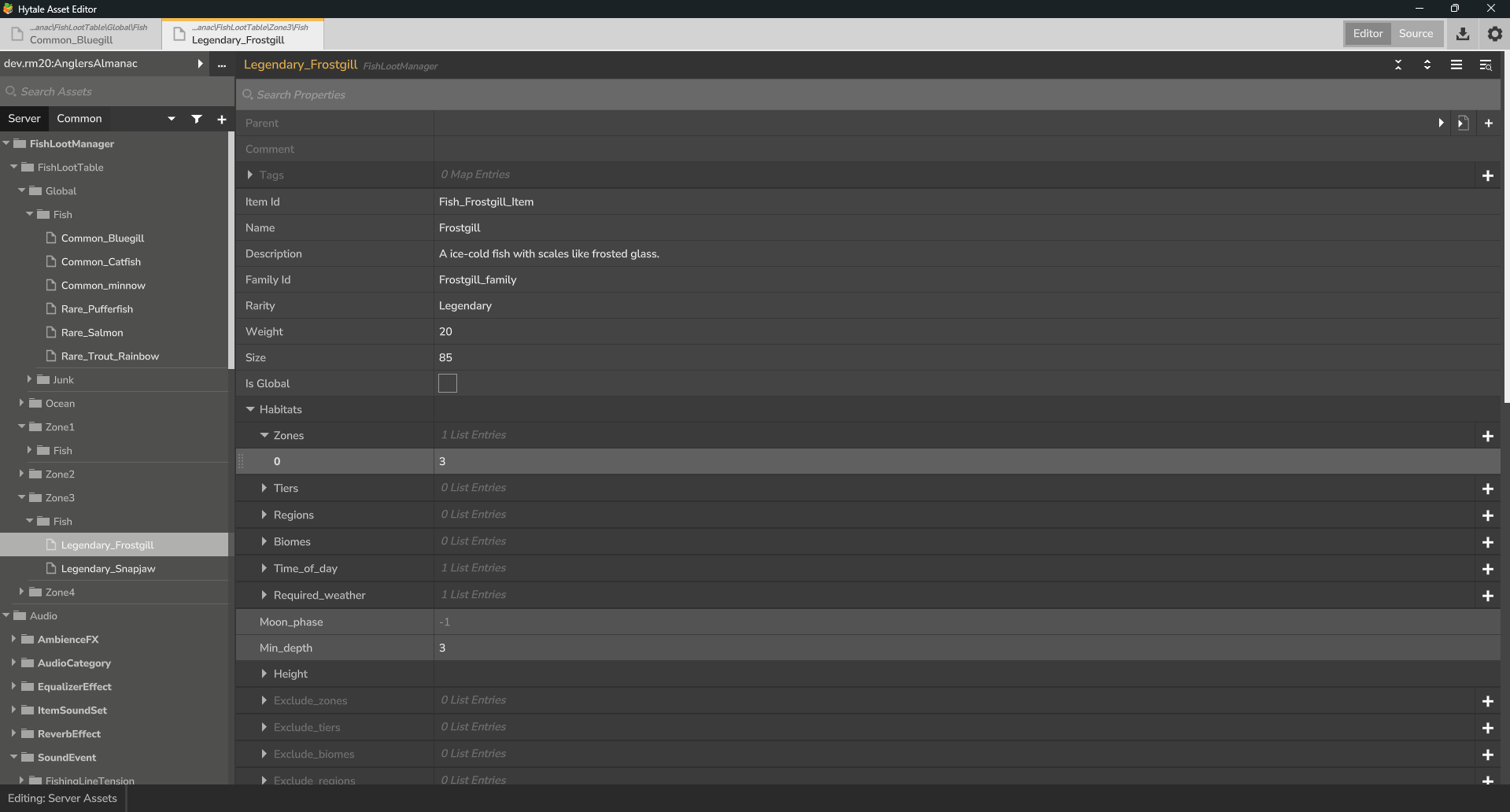
Once the asset is created, fill out the properties in the inspector:
- ItemId: Enter the actual Hytale ID (e.g.,
Ore_Iron). This tells the mod which item to actually give the player. - Name: The display name of the item (e.g., “Iron Ore”). *This is mainly for the Almanac
- Rarity: Set the rarity (Common, Uncommon, Rare, Epic, Legendary). *This is mainly for the Almanac
- Weight: Set the spawn weight (e.g.,
10). A higher weight makes it more common relative to other items in the same pool. - Quantity:
- Min: Minimum items dropped (e.g.,
2). - Max: Maximum items dropped (e.g.,
5). If Max is lower than Min, it will always drop the Min amount.
- Min: Minimum items dropped (e.g.,
3. Configure Spawning (Habitats)
The Habitats section controls where and when the item can be caught.
- IsGlobal: Check this box if you want the item to spawn anywhere in the world.
- Height: This allow you to make some fish only spawn underground or above ground.
- Min_y: The lowest level the item spawns (e.g.,
0). - Max_y: The highest level. Set to
-1for no upper limit.
- Min_y: The lowest level the item spawns (e.g.,
- Time of Day: You can restrict the loot to specific times (e.g.,
NightorDay) by adding entries to the list. - Min Depth: Set how deep the water needs to be for this loot to be eligible.
If you want to set specific zones and location
Ttip
Use
/zoneinfoto info name of the current biome you are in
- Biomes/Zones/Regions: Add specific Hytale biome strings to limit the loot to those areas.
- Exclusion Lists: Use
Exclude_biomesorExclude_zonesif you want the item to spawn everywhere except those places. This also overrides the isGlobal check. - Weight Multiplier: If an item is caught in an “excluded” zone, you can still let it spawn but at a reduced rate by setting this (e.g.,
0.1for a 10% chance).
Once you have done this you can now add your fish to the Almanac with info in 3. Adding your fish to the Almanac