File Location & Access
This is the settings file for the plugin. You can find it at:
{server/world}/mods/dev.rm20_AnglersAlmanac/configs/Config.json
In-Game Command: You can quickly access and edit these settings in-game by using:
/OpenConfig
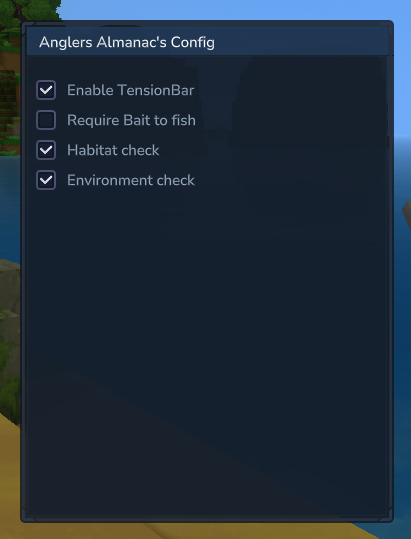
Default Configuration
If the file is not present, the plugin will use these default settings:
{
  "MinigameToUse": "TensionBar",
  "UseBait": false,
  "ShouldHabCheck": true,
  "ShouldEnvironmentCheck": true,
  "ShouldHookEntities": true,
  "EntityPullBaseForce": 60,
  "EntityPullDistanceMultiplier": 5,
  "EntityYMultiplier": 0.2
}
Settings Explained
1. Gameplay Mode
- MinigameToUse: Determines which minigame logic is active. By default, this is set to
"TensionBar". - UseBait: If set to
true, players will be required to have bait equipped/available to cast their rod.
2. Loot & Logic
- ShouldHabCheck: When enabled (
true), the plugin checks the fish’s specific habitat (e.g., coral reefs, open ocean) before deciding what can be caught. - ShouldEnvironmentCheck: When enabled (
true), the plugin considers external factors like depth (Y-level), water depth, and the time of day for loot results.
Note
If your looking at how to add in your own loot look at 2. Adding new loot and Loot File Structure You can also find info on rods/bait here too
3. Hooking Entities
- ShouldHookEntities: If entities can be hooked (including players)
- EntityPullBaseForce: The base horizontal pull force applied to a hooked entity.
- EntityPullDistanceMultiplier: How much stronger the horizontal pull gets the further away the entity is.
- EntityYMultiplier: How much higher the entity is launched upward based on their distance.