To create and register custom fishing minigames for Anglers Almanac, you will implement the Java handler interface and register it.
1. Implement the Minigame Handler
Create a new class that implements FishingMinigameHandler. This interface manages the minigame lifecycle from start to finish.
package dev.rm20.anglersalmanac.MinigameManager.Handlers;

import com.hypixel.hytale.component.CommandBuffer;
import com.hypixel.hytale.component.Ref;
import com.hypixel.hytale.protocol.InteractionType;
import com.hypixel.hytale.server.core.entity.InteractionContext;
import com.hypixel.hytale.server.core.entity.entities.Player;
import com.hypixel.hytale.server.core.inventory.InventoryComponent;
import com.hypixel.hytale.server.core.inventory.ItemStack;
import com.hypixel.hytale.server.core.modules.interaction.interaction.CooldownHandler;
import com.hypixel.hytale.server.core.universe.world.storage.EntityStore;
import dev.rm20.anglersalmanac.AnglersAlmanac;
import dev.rm20.anglersalmanac.Interactions.Rod.UseRodInteraction;
import dev.rm20.anglersalmanac.Metadata.FishingRodData;
import dev.rm20.anglersalmanac.Minigame.FishingMinigameHandler;
import org.jspecify.annotations.NonNull;

public class CustomMinigameHandler implements FishingMinigameHandler {

    @Override
    public void startGame(Ref<EntityStore> bobberRef, Player player, CommandBuffer<EntityStore> commandBuffer, int depth, ItemStack fishingRod) {

	    //MUST INCLUDE
        InventoryComponent.Hotbar hotbarComp = player.getReference().getStore().getComponent(
            player.getReference(),
            InventoryComponent.Hotbar.getComponentType()
        );
        if (hotbarComp == null) return;
		//MUST INCLUDE
        FishingRodData meta = fishingRod.getFromMetadataOrNull(FishingRodData.KEYED_CODEC);
        if (meta == null) {
            UseRodInteraction.cancelFishing(commandBuffer, player, fishingRod);
            return;
        }

        // Spawn your custom minigame entity or component
        CustomMinigameComponent minigame = CustomMinigameComponent.spawnMinigame(
            commandBuffer, player.getReference(), bobberRef, fishingRod.getItemId()
        );

		//MUST INCLUDE
        // Update the fishing rod metadata to track active minigame instance
        UseRodInteraction.updateMetadata(
            hotbarComp, // InventoryComponent.Hotbar
            hotbarComp.getActiveSlot(), // Slot
            hotbarComp.getActiveItem(), // Item (fishing rod)
            meta.getBoundBobber(), // Bobber UUID
            minigame.selfUUID, // Minigame UUID
            1 // rodMode (1 for in minigame)
        );
    }

    @Override
    public void cancelGame(CommandBuffer<EntityStore> commandBuffer, Ref<EntityStore> minigameRef) {
        CustomMinigameComponent minigame = commandBuffer.getComponent(minigameRef, CustomMinigameComponent.COMPONENT_TYPE);
        if (minigame == null) {
            AnglersAlmanac.LOGGER.atWarning().log("Missing ref for CustomMinigame on cancel");
            return;
        }
        minigame.despawnSelf(commandBuffer.getExternalData().getWorld());
    }

    @Override
    public boolean handleInteraction(CommandBuffer<EntityStore> commandBuffer, Ref<EntityStore> minigameRef, @NonNull InteractionType interactionType, @NonNull InteractionContext context, @NonNull CooldownHandler cooldownHandler) {

	    //MUST INCLUDE
        CustomMinigameComponent minigame = commandBuffer.getComponent(minigameRef, CustomMinigameComponent.COMPONENT_TYPE);
        if (minigame == null) {
            cancelGame(commandBuffer, minigameRef);
            AnglersAlmanac.LOGGER.atWarning().log("Missing ref for CustomMinigame on interaction");
            return false;
        }

        // Process player inputs (e.g., reeling, clicking, releasing)
        minigame.doInteraction(interactionType, context, cooldownHandler);
        return true;
    }
}
2. Lifecycle Methods Breakdown
startGame: Triggered when a bite occurs. Use this to validate player inventory state, spawn your minigame component/UI, and bind the minigame instance to the rod’s metadata.cancelGame: Executed if the minigame is forcibly aborted (e.g. player switches items, moves too far or the line snaps). Handles component despawning and world cleanup.handleInteraction: Intercepts active player input events. Returnstruewhen the input is successfully consumed by the minigame mechanics.
3. Creating the minigame.
To build out the actual minigame logic, you will be using the Entity Component System component that extends the base Minigame class and implements Hytale’s Component<EntityStore> interface.
The Component Skeleton
First, set up your class with the required ECS boilerplate, performance tracking, and the modifier hooks inherited from Minigame.java.
import com.hypixel.hytale.component.Component;
import com.hypixel.hytale.component.ComponentType;
import com.hypixel.hytale.server.core.universe.world.storage.EntityStore;
import dev.rm20.anglersalmanac.Minigame.Minigame;

public class CustomMinigameComponent extends Minigame implements Component<EntityStore> {
    public static ComponentType<EntityStore, CustomMinigameComponent> COMPONENT_TYPE;

    // Core references
    public Ref<EntityStore> ownerRef;
    public Ref<EntityStore> bobberRef;
    public UUID selfUUID;

    public CustomMinigameComponent(Ref<EntityStore> ownerRef, Ref<EntityStore> bobberRef, UUID selfUUID) {
        this.ownerRef = ownerRef;
        this.bobberRef = bobberRef;
        this.selfUUID = selfUUID;
    }

    @Override
    public Component<EntityStore> clone() {
        // Return a copy of your component's current state
        return new CustomMinigameComponent(this.ownerRef, this.bobberRef, this.selfUUID);
    }
}
Initialization & Spawning
Your component needs a static method (typically called spawnMinigame) to instantiate the entity when a fish bites. This is where you determine which fish is hooked and apply all statistical modifiers to the minigame’s difficulty.
public static CustomMinigameComponent spawnMinigame(CommandBuffer<EntityStore> commandBuffer, Ref<EntityStore> playerRef, Ref<EntityStore> bobberRef, String rodAssetId) {
    Holder<EntityStore> holder = EntityStore.REGISTRY.newHolder();
    UUID id = UUIDUtil.generateVersion3UUID();

    CustomMinigameComponent game = new CustomMinigameComponent(playerRef, bobberRef, id);

    // Roll for the hooked fish and apply its specific behaviors (e.g. darting, erratic)
    game.fishHooked = CatchUtils.FirstRoll(bobberRef, commandBuffer.getComponent(playerRef, Player.getComponentType()), commandBuffer, commandBuffer.getComponent(bobberRef, BobberComponent.getComponentType()).getWaterDepth());
    game.applyFishModifiers(game.fishHooked.getMinigameStats());

    // Apply the player's rod stats (control, difficulty, forgiveness)
    RodStats rodStats = MinigameRodStats.getRodStatsFromRodId(rodAssetId);
    game.applyRodModifiers(rodStats);

    holder.addComponent(CustomMinigameComponent.COMPONENT_TYPE, game);

    // Spawn the central minigame entity
    commandBuffer.getExternalData().getWorld().execute(() -> {
        commandBuffer.addEntity(holder, AddReason.SPAWN);
    });

    // Spawn your UI models around the bobber
    game.spawnMinigameAdditionals(commandBuffer, spawnPos);

    return game;
}
Handling Input
When the handler passes interaction events (like a player clicking to reel in), your component processes them to update the game state. In MinigameComponent_TensionBar.java
public void doInteraction(@NonNull InteractionType interactionType, @NonNull InteractionContext context, @NonNull CooldownHandler cooldownHandler) {
    // Example logic: Clicking pushes your custom minigame cursor upward
    this.barVelocity += 0.5f;
}
Cleanup and Despawning
You must forcefully despawn all associated entities when the game ends or is canceled to prevent ghost entities from lingering in the world.
public void despawnSelf(World world) {
    Store<EntityStore> store = world.getEntityStore().getStore();

    // Iterate through tracking lists and clear auxiliary models
    world.execute(() -> {
        for (UUID modelId : gameModels.values()) {
            Ref<EntityStore> ref = world.getEntityRef(modelId);
            if (ref != null && ref.isValid()) {
                store.removeEntity(ref, RemoveReason.REMOVE);
            }
        }

        // Remove the main minigame component itself
        Ref<EntityStore> selfRef = store.getExternalData().getRefFromUUID(selfUUID);
        if (selfRef != null && selfRef.isValid()) {
            store.removeEntity(selfRef, RemoveReason.REMOVE);
        }
    });
}
Applying Stats (Modifiers)
To ensure different fishing rods and fish rarities actually impact gameplay, you must implement the abstract modifier methods inherited from Minigame.java. For example, MinigameComponent_TensionBar.java alters the speed and gravity of the tension bar based on the rod’s control stat, and scales the minigame’s difficulty radius based on the rod’s difficulty stat. You will need to write the specific logic dictating how applyFishBehaviourModifer and applyRodForgivenessModifer alter your unique custom minigame’s variables.
Implementing a config to control your minigame's variables makes it significantly easier to test and fine-tune mechanics on the fly. Instead of recompiling your code every time you want to adjust a speed, radius, or UI scale, you can quickly tweak the numbers in real-time. See MinigameConfig_TensionBar.java for more info
4. Register the Handler
Register your custom handler with MinigameRegistry inside your plugin’s setup() lifecycle method:
import dev.rm20.anglersalmanac.Minigame.MinigameRegistry;

@Override
protected void setup() {
    // Register custom minigame handler with a unique string ID
    MinigameRegistry.register("CustomMinigame", new CustomMinigameHandler());
}
Registering a minigame with an ID that already exists will overwrite the previous handler and will log a warning to the console.
5. Enabling minigame
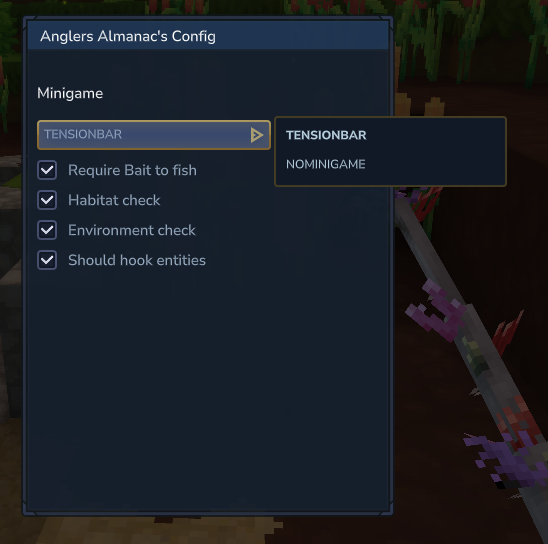
Once registered your minigame should be an option to choose from in the config UI which you can access by doing /openconfig.
There will be ways to attach minigames to certain rods or even a % system for minigames.